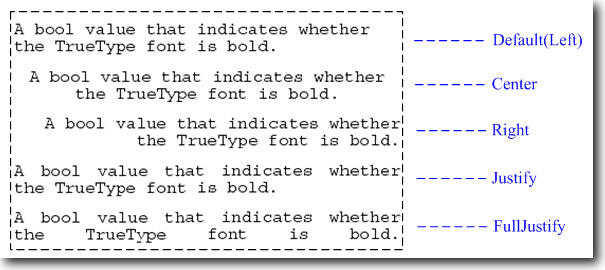
Text alignment is one of the basic yet important feature offered by Aspose.Pdf that is used to give a decent look to text paragraphs. Aspose.Pdf provides an enumeration AlignmentType that comes with pre-defined types of alignment as follows:
|
Alignment Type |
Description |
|
Center |
Aligns the text in center |
|
Left |
Aligns the text in left |
|
Right |
Aligns the text in right |
|
Justify |
Aligns the text on both left and right margins except the last line which will be left aligned |
|
FullJustify |
Aligns the whole text on both left and right margins |
The Text class encapsulates TextInfo instance which has a further property named Alignment that is used to set text alignment. We can assign any pre-defined value of AlignmentType enumeration to Alignment property of Text.TextInfo according to our requirement.
Note: You should not use Segment.TextInfo.Alignment .
In the current version, Justify and FullJustify alignment types are supported only in single-segment text paragraph.
The following figure shows the alignment types: